New Automation Builder: Conditional Branching, Deep Analytics & More
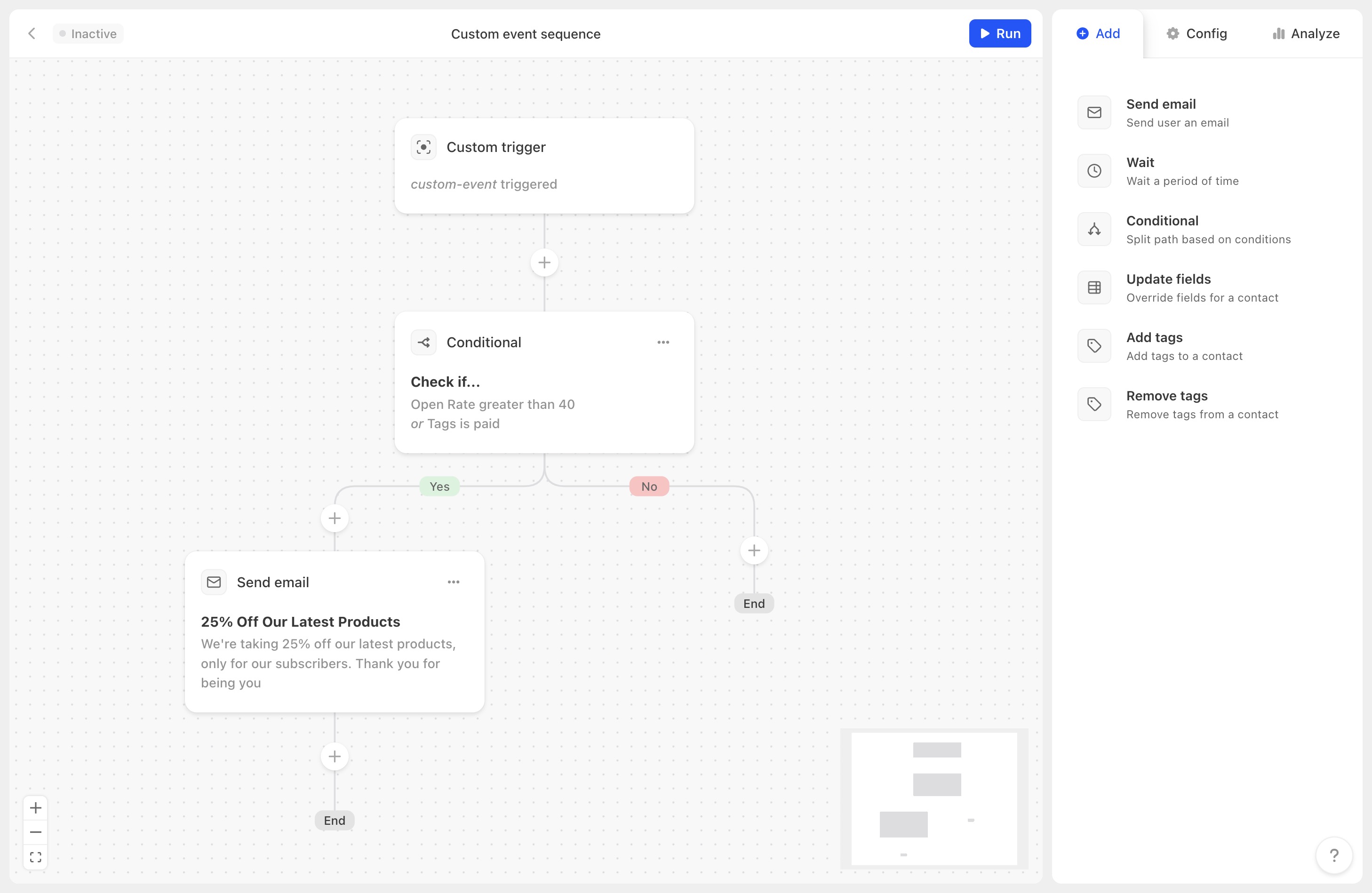
Our automations have been one of Audienceful's most requested areas for expansion. Today we're shipping a ground-up rebuild of the automation builder that puts us on par with platforms charging 5-10x what we do.
Conditional Branching 🔀
This is the big one. You can now split your automations into branches based on real subscriber data, no code required.
Branch on any combination of:
- Tags: Does this person have a specific tag?
- Custom field values: What's their role, plan tier, or any other field you track?
- Audience membership: Are they in a specific segment?
- Engagement data: Have they opened or clicked previous emails in this flow?
Each branch runs its own independent sequence of actions, so you can build truly personalized journeys. Send different content to free vs. paid users, branch based on quiz answers from your forms, or route people down different paths based on how they've engaged with earlier emails.
Six Powerful Trigger Types 🎯
Every automation starts with a trigger. We now support six:
- Person subscribes: From any source, including forms, imports, or the API
- Person enters audience: When someone matches a dynamic audience segment
- Person leaves audience: When someone no longer matches (perfect for win-back flows)
- Custom event: Trigger from any external platform via our Events API or Zapier
- Stripe event: Natively trigger from subscriptions, cancellations, failed payments, and more
- Shopify event: Trigger from new orders, abandoned checkouts, and customer creation
Six Action Types ⚡
Chain these in any combination to build flows as simple or complex as you need:
- Send email: Pick any draft and theme, and edit inline without pausing the automation
- Wait: Pause for hours, days, or weeks
- Conditional: Branch the flow based on subscriber data
- Update fields: Automatically set custom field values as people move through the flow (great for lifecycle tracking or lead scoring)
- Add tags: Apply tags at any point, which can feed into audience segments or trigger other automations
- Remove tags: Clean up tags after a flow completes or transition between segments
Deep Per-User & Per-Email Analytics 📊
Every automation now comes with detailed analytics built in:
- Per-email metrics: Track opens, clicks, and unsubscribes for each individual email in your sequence. Identify exactly where people drop off.
- Per-user tracking: See where each contact currently is in a flow, which emails they've received, and how they've engaged.
- Conversion tracking: Attribute revenue and conversions back to specific automations and emails. Measure the real ROI of your welcome sequences, ecommerce flows, and nurture campaigns.
Live Editing Without Pausing ✏️
You can update email content inside a running automation without pausing anything. Edit your draft, and when you're ready, push the changes live with one click. Subscribers already in the flow continue seamlessly.
Weekend Controls 📅
For B2B teams, you can now configure which days of the week your automation emails are allowed to send. Uncheck Saturday and Sunday, and your automations will dynamically pause during those days, no workaround needed.
Smart Time-of-Day Sending 🕐
Audienceful tracks what time each subscriber triggered the automation and uses that as the default send time for subsequent emails in the same flow. Since most audiences are global, this ensures emails arrive when each individual subscriber is most likely to engage.
You can also override this with a fixed send time per automation if you prefer.