SaaS lifecycle email marketing sends each user the email that fits where they are in their relationship with your product: signed up, activated, trialing, paying, at risk, churned. Each stage is defined by an event in your data, such as a signup from your auth provider, a trial or failed payment from Stripe, or an action in your app, and each event starts or stops a flow. Audienceful connects natively to Stripe and Clerk and accepts custom events from your app, so the stages below map directly to triggers.
This is the hub for our SaaS email guides. It covers the stages and what moves people between them, the data you need, a master table of flows, each stage in turn with links to the detailed guides, the tooling question, and metrics by stage. Vendor prices were checked on 14 November 2026.
The SaaS lifecycle map
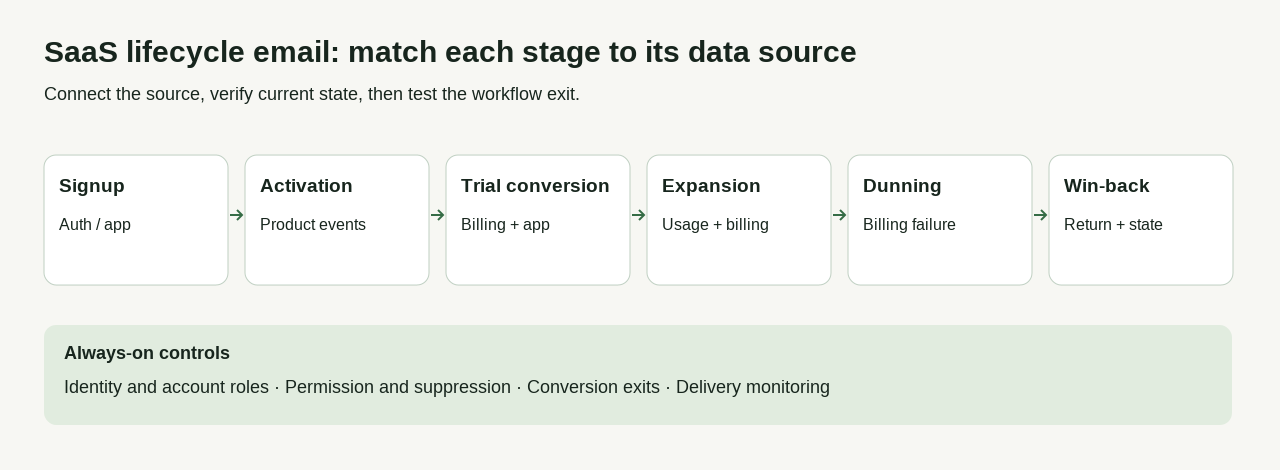
The stages, in order:
- Signed up. Has an account, hasn't done anything meaningful yet.
- Activated. Has done the action that predicts retention.
- Trialing. On a time-limited trial (can overlap with the first two).
- Paying. Has an active subscription.
- Expanding. Paying and growing: more seats, higher plan, annual billing.
- At risk. Paying, but usage has dropped or a payment has failed.
- Churned. Subscription has ended, by choice or by failed payment.
- Won back. Returned after churning.
Not every product has every stage. A freemium product may have no trial. A sales-led product may have no self-serve upgrade. Skip the stages you don't have, but be explicit about it.
What moves someone between stages
The lifecycle only works if each transition is a real event, not a guess. Here's what typically defines each move:
| Transition | Event | Source |
|---|---|---|
| Visitor to signed up | user.created or your own signup event |
Auth provider (Clerk, Auth0) or your app |
| Signed up to activated | Your activation event, e.g. report_shared |
Your app |
| Signed up to trialing | Subscription status trialing |
Stripe |
| Trialing to paying | Subscription becomes active, or invoice.paid |
Stripe |
| Paying to expanding | Quantity or price increases on the subscription | Stripe |
| Paying to at risk (billing) | invoice.payment_failed, status past_due |
Stripe |
| Paying to at risk (usage) | No key event for 14 to 30 days | Your app (absence of an event) |
| Paying to churned | customer.subscription.deleted, or scheduled to cancel |
Stripe |
| Churned to won back | New active subscription for a past customer | Stripe |
Three data sources cover almost all of it: auth for signups, billing for money, and product events for behavior. If your email tool can't receive one of the three, that stage runs on guesswork.
The data you need
Auth (signups). Every user should become a contact the moment they sign up, with a user ID that matches your database. Audienceful's Clerk integration does this with a webhook, no code, and stores the Clerk user ID and signup date as fields. With another provider, call the API on signup.
Billing (Stripe). Plan, status, trial dates, MRR and payment events. With a native Stripe connection, customers sync with their subscription data and Stripe events become triggers. Our Stripe email automation guide lists the events that matter.
Product events. Activation, feature use, limits reached, last active date. These come from your app through an API. Audienceful's custom events take an event name, an email and any properties you want to use in the email. See event-based email automation for naming and setup.
Get these three flowing before you write a single email. Most lifecycle programs that fail do so because the data is wrong, not the copy.
Master SaaS lifecycle flows table
| Stage | Flow | Trigger | Timing | Exit | KPI |
|---|---|---|---|---|---|
| Signed up | Verification | Signup | Instant, reminders at a few hours and a day | Verified | Verification rate |
| Signed up | Welcome and activation | Signup | Day 0 to day 7 | Activation event | Activation rate |
| Activated | Next-step onboarding | Activation event | Day 0 to day 14 after activation | Second key action | Week 4 retention |
| Trialing | Trial nurture | Trial started | Across the trial | Paid | Trial-to-paid rate |
| Trialing | Trial ending | Trial ending soon | 3 days and 1 day before end | Paid | Trial-to-paid rate |
| Paying | Feature adoption | Feature launch or not-used event | Launch, then 7 to 14 days | Feature used | Feature adoption |
| Paying | Expansion | Limit reached, seats added, tenure | When it happens | Upgraded | Expansion MRR |
| At risk | Dunning | Payment failed | Day 0, 3, 7, final notice | Invoice paid | Recovery rate |
| At risk | Re-engagement | No key event for 14 to 30 days | Once, then a week later | Key event | Reactivation rate |
| Churned | Cancellation | Scheduled to cancel or canceled | Instant, then before access ends | Resumed | Save rate |
| Churned | Win-back | Canceled | 30 and 90 days after | Resubscribed | Win-back rate |
Every flow has an exit. A flow without an exit eventually emails a paying customer to "please upgrade", which is the fastest way to look like you don't know who they are.
Onboarding and activation
The first week decides most of what follows. The aim is one action: the activation event. Pick it by looking at what retained users did early that churned users didn't, then build a short sequence that nudges toward it and stops when it happens.
Start with a welcome email that has one job, then check after 24 and 48 hours whether the user has activated, and branch. Activated users get the next step. Everyone else gets help reaching the first one. For the full first-week plan, see the SaaS onboarding email sequence. Our guide to user activation emails has the full six-email sequence with triggers and exits.
Trial conversion
If you run a trial, the trial sequence is the flow with the biggest payoff. It's two automations working together: a nurture that runs from trial start and a closing sequence that starts from Stripe's trial-ending event.
Benchmarks help set expectations. ChartMogul's SaaS conversion report (February 2026) puts a good free-to-paid rate at 25% to 35% for card-required trials and 4% to 6% for no-card trials. Trial-to-paid conversion emails covers day-by-day timing for 7, 14 and 30-day trials, with copy.
In Audienceful, the trial onboarding and trial-ending flows are ready-made templates with the Stripe trigger already set.
Adoption and feature announcements
Paying customers who use more of the product stay longer. Adoption emails do two things: tell the right customers about new features, and nudge customers who haven't found the features that make the product stick.
Target by plan and usage, not the whole list, and follow each launch with an event-triggered nudge to people who haven't tried it. Feature announcement emails has templates and the launch sequence, and product update emails covers the monthly round-up. For the bigger picture of planning these sends across the year, see SaaS email marketing strategy.
Expansion and upgrades
Expansion emails go out when a customer shows they need more:
- Hit a plan limit. Seats, projects, contacts, API calls.
- Used a higher-plan feature in a trial of that feature.
- Team growth. Several new users invited in a month.
- Tenure on monthly billing. After three to six paid months, offer annual billing.
These are event-triggered, not scheduled. The monthly to annual upgrade email guide covers the annual pitch, and price increase emails covers the other direction.
Billing: dunning and failed payments
Involuntary churn is a real share of the total. Recurly's churn benchmarks (July 2026 data) split SaaS churn into 2.16% voluntary and 1.06% involuntary, so roughly a third comes from failed payments rather than decisions. Stripe's Billing page says businesses on Stripe recover 55% of failed payments on average.
Stripe retries the card. Your emails get the customer to fix whatever made it fail. Send a calm notice on day 0, reminders at day 3 and 7, and a final notice before retries run out, and stop the moment the invoice is paid. Failed payment email templates has ten templates and the timing against Stripe's default retry schedule. In Audienceful, the failed payment dunning flow starts from Stripe's payment failed trigger.
At risk, churn and win-back
Two kinds of at-risk customers need different emails. Billing risk is handled by dunning. Usage risk, a paying customer who has stopped logging in, needs a re-engagement email that reminds them what they're paying for and offers help. Trigger it from the absence of your key event over 14 to 30 days. Reactivation emails for inactive users has templates and timing.
When a customer does cancel, send a clean confirmation with the end date and data policy, then win-back emails at around 30 and 90 days. SaaS cancellation emails covers the full sequence, and the subscription win-back flow starts from Stripe's canceled trigger.
ChartMogul's SaaS retention report (2023, data from 2,100+ SaaS businesses) is a useful reality check: top-quartile companies at $3m to $8m ARR keep around 80% of customers over a year. Lifecycle email won't change your product, but it does decide how many of the recoverable customers you actually recover.
Transactional vs marketing: one platform or two?
Lifecycle programs mix both kinds of email. Verification, receipts and dunning are transactional. Onboarding nudges and win-backs are lifecycle marketing. Many teams send the first through a developer API like Postmark or Resend and the second through a marketing tool.
That split has costs. Two sets of templates in two editors, two sets of logs to check when a customer says they never got something, and no single view of what a customer has received. The alternative is one platform that does both. Audienceful sends transactional email through an API that renders drafts designed in the same editor as your campaigns, with idempotency keys so retries never double-send. More on the trade-off in transactional and marketing email on one platform.
Whichever you choose, keep marketing unsubscribes from blocking transactional messages, and keep promotions out of transactional emails.
Tooling: what a SaaS lifecycle email platform must do
The requirements follow from the data and the flows:
- Native billing events. Trial started, trial ending, payment failed, canceled. Native beats routing webhooks through Zapier, which adds a failure point to your most important flows.
- Signup sync from your auth provider.
- Custom events with properties from your app, usable as triggers and in conditions.
- Branching and exits on events, fields and segments.
- Transactional sending if you want one platform.
- Revenue attribution to see which flows earn money.
- API and agent access, so your team (or an AI agent) can build and change flows without clicking through every screen.
SaaS lifecycle tools compared
Prices checked on 14 November 2026 on each vendor's page.
| Tool | Starting price | 10K contacts | Billing data | Notes |
|---|---|---|---|---|
| Audienceful | Free plan | Growth $118/mo billed yearly | Native Stripe and Clerk, ready Stripe flows | Transactional API, custom events, AI agent, MCP server |
| Customer.io | Essentials $100/mo | Essentials $145/mo (profiles) | Via API, CDP or integrations | Deep journeys; profiles can include objects |
| Loops | Free up to 1,000 contacts; Growth $49/mo up to 5,000 | Not listed on pricing page | Stripe and Clerk integrations | Marketing and transactional sends included |
| Userlist | See pricing page | Based on user capacity; confirm with vendor | Stripe via Zapier, per its listing | Company-level accounts for B2B |
| Vero | Starter $54/mo (5,000 profiles) | Professional, custom quote | Via API and integrations | Email, push and SMS |
| Intercom | Essential $29 per seat/mo billed monthly, $19 billed yearly | Email campaigns pay-as-you-go | Via integrations | Support suite with outbound messaging |
At 10K contacts, Audienceful's Growth plan is $118 a month billed yearly, below Customer.io Essentials at $145 a month. The other tools at that size are quote-based or not listed, so ask for a quote at your real contact count before comparing. Customer.io's entry price is from its pricing page as recorded in our Customer.io pricing breakdown.
For a full side-by-side, see best lifecycle email software for SaaS, best onboarding email software, best email marketing for SaaS, and the head-to-heads with Customer.io, Loops and Intercom.
What you get with Audienceful
- Stripe and Clerk, native. Connect both in minutes. Stripe events (trial started, trial ending soon, payment failed, past due, scheduled to cancel, canceled and more) are triggers, and Stripe revenue lands on each contact for segmentation.
- Ready-made lifecycle flows. The Stripe automation templates arrive with the trigger set: trial onboarding, trial ending, dunning and win-back.
- Custom events and branching from your own app through the event API.
- Revenue attribution that credits Stripe payments to the email or flow that preceded them.
- AI agent and MCP. Describe a flow and the AI agent builds it. Or use the MCP server from Claude, ChatGPT or Cursor to run campaigns, segments and flows. Our guide to lifecycle emails with Claude Code shows that workflow.
- A collaborative editor where product, marketing and design work on the same email at once, plus agency-designed templates.
- Deliverability monitoring, spam testing and manual sender approval.
Metrics by stage
| Stage | Primary metric | Secondary |
|---|---|---|
| Signed up | Verification rate | Time to verify |
| Activation | Activation rate within 7 or 14 days | Median time to activate |
| Trial | Trial-to-paid rate by cohort | Activated vs not-activated conversion |
| Adoption | Feature adoption within 30 days | Accounts using 3+ key features |
| Expansion | Expansion MRR | Monthly-to-annual switches |
| Billing | Failed payment recovery rate | Involuntary churn rate |
| At risk | Reactivation rate | Usage 30 days after re-engagement |
| Churned | Win-back rate at 90 and 180 days | Win-back revenue |
Measure by cohort, keep voluntary and involuntary churn separate, and judge each flow by the outcome it's meant to change, not by opens.
FAQs
What is lifecycle email marketing for SaaS?
It's sending emails based on where each user is in their relationship with your product, from signup through activation, trial, paying, expansion, risk and churn. Each email is triggered by an event, like a signup, a product action or a Stripe billing change, rather than sent to the whole list on a calendar.
What are the stages of the SaaS customer lifecycle?
A common model is signed up, activated, trialing, paying, expanding, at risk, churned and won back. Each stage is defined by a specific event in your auth, billing or product data, so a user's stage is always a fact rather than an estimate.
Which lifecycle emails matter most?
For most SaaS products: the activation sequence, the trial-ending emails and the dunning sequence. Activation decides who sticks around, trial-ending emails capture the decision point, and dunning recovers revenue from customers who didn't mean to leave.
Do I need a separate transactional email provider?
No, if your lifecycle platform has a transactional API. Running both on one platform keeps templates, logs and customer history in one place. Some teams still split them for historical reasons, which works fine as long as unsubscribes and suppression lists are handled correctly in both.
Which tool is best for SaaS lifecycle email?
The one that receives your billing, signup and product events natively and can branch and exit on them. Audienceful connects to Stripe and Clerk natively, takes custom events from your app and ships ready-made Stripe flows. Customer.io suits teams that want deep journeys and route data in themselves, and Loops suits small teams that want a simple tool.
Want your lifecycle flows running on real billing and signup data? Start with Audienceful, connect Stripe and Clerk, and switch on the pre-built lifecycle flows.
